This feature lets you temporarily isolate problematic tests without disrupting your entire test suite.
You can mark flaky tests as quarantined so Bitrise will skip them in future builds. Quarantined tests are tracked in a separate “Test Quarantine” tab and will continue being skipped from your builds until you remove them from quarantine.
Why this matters
Flaky tests waste time and compute. They fail intermittently, trigger reruns, and bury real failures in noise. Quarantine lets you isolate known flaky tests without disabling whole suites or rewriting workflows, so your builds stay fast and your signal stays clean while you fix the tests.
Setup instructions
 Adding tests to quarantine
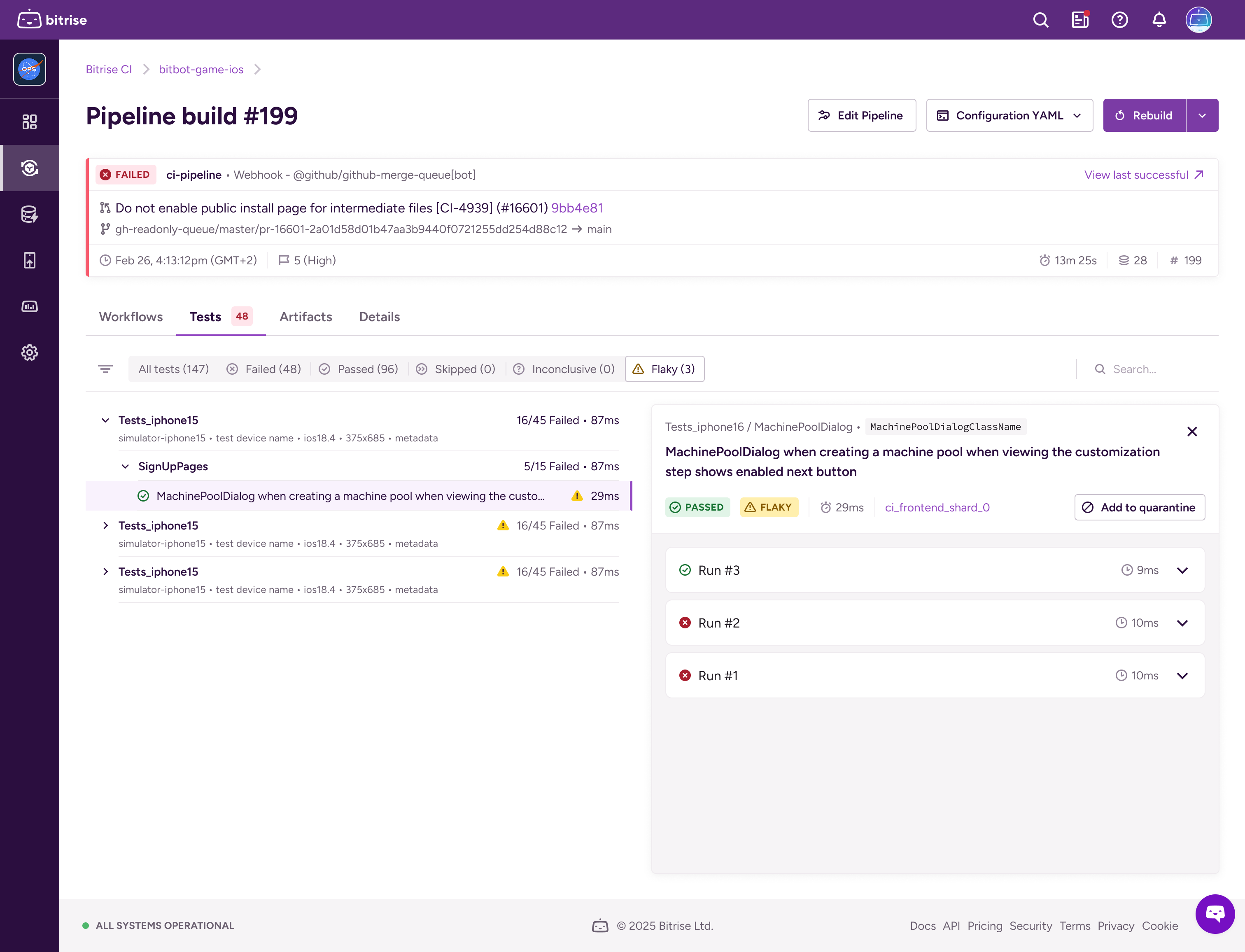
 From test reports
- Navigate to the “Flaky” tab in any test report.
- Click “Add to quarantine” next to any flaky test.
- Define the quarantine scope (workflows, pipelines, or branches).
- Add an optional comment for future reference.
 From insights

- Go to Insights > Tests > Flaky tests > Test cases
- Apply the Project filter
- Click “Add to quarantine” next to any test in the breakdown view
- Configure the quarantine scope and conditions
- Submit to exclude the test from future runs
Defining the scope of quarantine

- Default behaviour: By default, quarantine applies to all builds on your project unless you specify otherwise. Leave fields empty to skip the test on all branches and all targets (workflows and pipelines).
- Limit scope
- Branch (optional): enter space-separated branch patterns with wildcard support (
*). Examples:main,release-*,feature/auth-* - Targets (optional): enter space-separated workflow and pipeline names. Examples:
ci,nightly-tests,release-pipeline - Combining fields narrows the scope. If you set both branches and targets, the test is quarantined only when both the branch AND the target match. Keep patterns tight to avoid silencing too much. Prefer
release-*over*and target the specific workflow that runs the flaky test. - Add context (optional). Use the optional comment to note the reason and include a ticket link so you remember why you quarantined it.
- You can edit or remove the scope later from the quarantine dashboard,
 Managing quarantined tests

Access the quarantine dashboard from the new “Test Quarantine” section on your CI home page. The dashboard shows:
- Test name and module path
- The build where the test was quarantined
- Timestamp and user who quarantined it
- Direct links to insights for each test
 Permissions
- Admin, platform engineer, developer: full read/write/edit access
- Tester/QA: read-only access
 A new env var -
 $BITRISE_QUARANTINED_TESTS_JSON
- During builds, Bitrise injects the scoped list of quarantined tests into
$BITRISE_QUARANTINED_TESTS_JSON. Supported steps read this variable to skip those tests and exclude them from automatic reruns. - If you use custom steps or direct runner calls, parse
$BITRISE_QUARANTINED_TESTS_JSONand filter your test runner arguments accordingly. - Here is an example of the value in the env var.
BITRISE_QUARANTINED_TESTS_JSON = "[
  {
     testCaseName: 'EnableQuarantiningDisabledByPlan',
     testSuiteName: ['UITests', 'CI', 'Settings'],
     className: 'BuildSettings'
  },
  {
     testCaseName: 'EnableQuarantiningDisabledByLDFlag',
     testSuiteName: ['UITests', 'CI', 'Settings'],
     className: 'BuildSettings'
  }
  ...
]"
When to use it
- A test passes locally but fails intermittently in CI
- You’ve identified a flaky test, but don’t have time to fix it immediately
- You want to maintain green builds while investigating test stability issues
- You need to prevent automatic reruns from consuming build minutes on known problematic tests
For example
- An Xcode ui test is timing out on older simulators only on your release branch. Quarantine that test for the release branch and the release workflow to keep releases moving while you debug.
- Espresso test that intermittently fails on CI due to animation settings. Quarantine for nightly pipeline runs to avoid noisy flakes, but keep it active in a separate stabilisation workflow.
- Detox e2e test that depends on a flaky third-party API. Quarantine on main to unblock PRs, add a comment with the upstream issue, and keep the test enabled on a canary branch for verification.
Things to note
- Visibility on test report: Quarantined tests that were not executed in a build will not show up on your Test reports today. We plan to enhance this experience in the future so that you can identify which tests were not executed in the specified build because they were quarantined.
- Lifecycle: tests stay quarantined until you remove them.
- Supported steps: The following steps will automatically skip the quarantined tests within the specified scope. If you use custom steps or direct runner calls, parse
$BITRISE_QUARANTINED_TESTS_JSONand filter your test runner arguments accordingly.- Xcode Test for iOS
- iOS Device Testing
- Android unit test
- Virtual Device Testing for Android
 Tips
Tips
- Scope narrowly. Prefer quarantining on the branches/workflows where the flakiness occurs.
- Leave a comment. When you add a test to quarantine, you will have an option to add a comment. Include a brief reason or a hypothesis to facilitate cleanup.
- Set a regular review. Use the dashboard to prune long-lived quarantines and reintegrate fixed tests.
Availability
Enterprise plans only.